Connect with us

UI/UX

User Persona

Published

on

persona ux web digital ads

What Is a persona?

A user persona is a representation of the goals and behavior of a hypothesized group of users. In most cases, personas are synthesized from data collected from interviews with users. A persona represents a cluster of users who exhibit similar behavioral patterns in their purchasing decisions, use of technology or products, customer service preferences, lifestyle choices, and the like. For each product, more than one persona is usually created, but one persona should always be the primary focus for the design. Behaviors, attitudes, and motivations are common to a “type” regardless of age, gender, education, and other typical demographics. In fact, personas vastly span demographics.

Whether the final product is a website, software application, mobile app, or interactive kiosk, a user-centered design can only be achieved if we know who is going to use it and if that knowledge informs our design. An entire arsenal of user-research methods can be employed to achieve a user-centered design.

The classification of persona

Personas can be classified into 2 types in general: Marketing Persona and Design Persona.

  1. Marketing Personas are typical characters of the customers of a product or a company, they have similarities in buying preference, social relations, mode of consumption and ages. Personas help the company determine how their customers will be;
  2. Design Personas (For example the User Personas and the UX Personas) refer to the representatives of users of a product or service that have similar points in usage customs, product requirements, preferences and goals. They can describe the needs of potential users and help developers put their focus back on users during the function design, and make products conform to user requirements.

What is an agile persona?

A persona, first introduced by Alan Cooper, defines an archetypical user of a system, an example of the kind of person who would interact with it. In other words, personas represent fictitious people which are based on your knowledge of real users.

What is a customer persona?

A buyer persona is a semi-fictional representation of your ideal customer based on market research and real data about your existing customers. When creating your buyer persona(s), consider including customer demographics, behavior patterns, motivations, and goals.

Why do you need a persona?

Understanding the needs of your users is vital to developing a successful product. Well-defined personas will enable you to efficiently identify and communicate user needs. Whether you’re developing a smartphone app or a mobile-responsive website, it’s very important to understand who will be using the product. Knowing your audience will help influence the features and design elements you choose, thus making your product more useful. A persona will also help you describe the individuals who use your product, which is essential to your overall value proposition and clarifies who is in your target audience by answering the following questions:

  • Who is my ideal customer?
  • What are the current behavior patterns of my users?
  • What are the needs and goals of my users?

persona web digital ads

How do you define a user persona?

A well-defined user persona contains four key pieces of information:

  • Header
  • Demographic Profile
  • End Goal(s)
  • Scenario

Common pieces of information to include are:

  • Name, age, gender, and a photo
  • Tag line describing what they do in “real life”; avoid getting too witty, as doing so may taint the persona as being too fun and not a useful tool
  • Experience level in the area of your product or service
  • Context for how they would interact with your product: Through choice or required by their job? How often would they use it? Do they typically use a desktop computer to access it, or their phone or other device?
  • Goals and concerns when they perform relevant tasks: speed, accuracy, thoroughness, or any other needs that may factor into their usage
  • Quotes to sum up the persona’s attitude

Benefits of personas

Personas help to focus decisions surrounding site components by adding a layer of real-world consideration to the conversation. They also offer a quick and inexpensive way to test and prioritize those features throughout the development process. In addition they can help:

  • Stakeholders and leaders evaluate new site feature ideas
  • Information architects develop informed wireframes, interface behaviors, and labeling
  • Designers create the overall look and feel of the website
  • System engineers/developers decide which approaches to take based on user behaviors
  • Copy writers ensure site content is written to the appropriate audiences

Four different perspectives on personas

In her Interaction Design Foundation encyclopedia article, Personas, Ph.D and specialist in personas, Lene Nielsen, describes four perspectives that your personas can take to ensure that they add the most value to your design project and the fiction-based perspective. Let’s take a look at each of them:

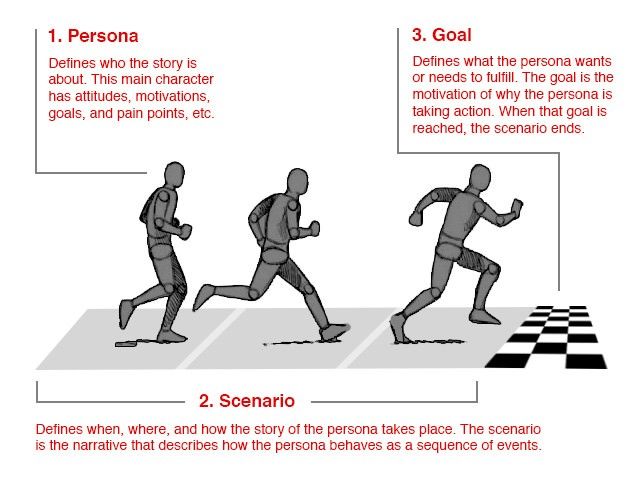
1. Goal-directed Personas

The objective of a goal-directed persona is to examine the process and workflow that your user would prefer to utilise in order to achieve their objectives in interacting with your product or service. The goal-directed personas are based upon the perspectives of Alan Cooper, an American software designer and programmer who is widely recognized as the “Father of Visual Basic”.
9b41e7956f74eb1629d4c189f193097b

Author/Copyright holder: Smashing Magazine. Copyright terms and licence: All rights reserved. Img Source

2. Role-Based Personas

The role-based perspective is also goal-directed and it also focusses on behaviour. The personas of the role-based perspectives are massively data-driven and incorporate data from both qualitative and quantitative sources. An examination of the roles that our users typically play in real life can help inform better product design decisions. Where will the product be used? What’s this role’s purpose? What business objectives are required of this role? Who else is impacted by the duties of this role? What functions are served by this role? Jonathan Grudin, John Pruitt, and Tamara Adlin are advocates for the role-based perspective.

3. Engaging Personas

“The engaging perspective is rooted in the ability of stories to produce involvement and insight. Through an understanding of characters and stories, it is possible to create a vivid and realistic description of fictitious people. The purpose of the engaging perspective is to move from designers seeing the user as a stereotype with whom they are unable to identify and whose life they cannot envision, to designers actively involving themselves in the lives of the personas. The other persona perspectives are criticized for causing a risk of stereotypical descriptions by not looking at the whole person, but instead focusing only on behavior.”
– Lene Nielsen

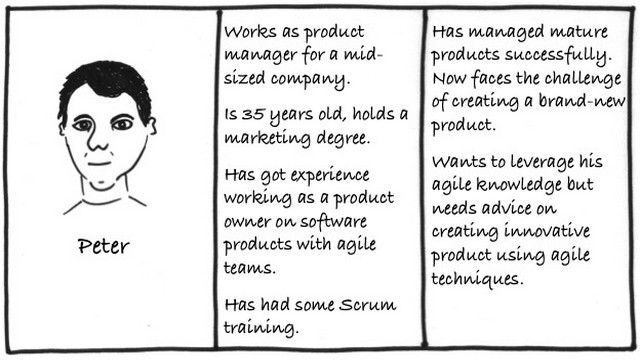
Engaging personas can incorporate both goal and role-directed personas, as well as the more traditional rounded personas. These engaging personas are designed so that the designers who use them can become more engaged with them. The idea is to create a 3D rendering of a user through the use of personas. These personas examine the emotions of the user, their psychology, backgrounds and make them relevant to the task in hand. The perspective emphasises how stories can engage and bring the personas to life. One of the advocates for this perspective is Lene Nielsen.
8f9de451987dcf58884332b56b51a62f

Author/Copyright holder: Terri Phillips. Copyright terms and licence: All rights reserved. Img Source

4. Fictional Personas

The fictional persona does not emerge from user research (unlike the other personas) but it emerges from the experience of the UX design team. It requires the team to make assumptions based upon past interactions with the user base, and products to deliver a picture of what, perhaps, typical users look like.

Where can you get excellent user persona template?

Some online medium for creating persona.

1) McorpCX Persona

McorpCX Persona provides a way to better understand the customers you serve. It has 15-year industry-leading customer experience practices based on personas.

2) Xtensio

It’s an online user persona template covers 6 of the 7 Persona topics. Xtensio helps you come up with your ideal user “types.”

3) Hubspot

Hubspot covers all of the Persona topics but ‘Customer media & device preference and Biography’. It introduces the concept of what is Negative Personas.

4) Akoonu

Akoonu provides good motivation to start a company and help marketers understand their buyers better. Moreover, it helps sales figure out if a buyer is going to buy.

5) Inflow

There are lots of template out there for content gap analysis, many of which take into account personas and each stage of their buying cycle.

6) UserForge

This user persona template helps you start prioritizing design decisions and get to the wins sooner.

7) Content Harmony

It’s a free user persona template is easy to understand and gives you a compact, two-page snapshot of what a typical customer might look like.

 87,858 total views,  6 views today

Spread the love

Designer | Ideator | Thinker | Love Reading, Writing | Wildlife | Passionate about Learning New Stuff & Technologies. For suggestions and questions if you have any, then you can visit this link. (Disclaimer : My views are entirely my own and have nothing to do with any organisation)

Continue Reading
Click to comment
0 0 votes
Article Rating
Subscribe
Notify of
guest
0 Comments
Most Voted
Newest Oldest
Inline Feedbacks
View all comments

AI

The rise of agentic AI, what it means today, and how it’s already changing work and research

Published

on

The rise of agentic AI what it means today

Agentic AI marks a step beyond chatbots and single-turn generative models, it signifies systems that can plan, act, and coordinate over multiple steps with limited human supervision. Instead of only replying to prompts, agentic AI systems set subgoals, call tools, and execute actions across services and data sources, often with persistent memory and feedback loops.

What is agentic AI, in plain terms

Agentic AI is a class of systems that, given a high-level goal, can autonomously plan a sequence of steps, call external tools or APIs, monitor outcomes, and adapt their plan as needed. They typically combine large language models for reasoning and language, with tool integrations, memory stores, and orchestration layers that coordinate multiple specialized agents. Agentic systems are goal-oriented, proactive, and designed to act in the world, not just generate text. IBM+1

Why the distinction matters, briefly:

  • Traditional LLMs respond to prompts, they are reactive.
  • Agentic AI makes decisions, executes actions, and keeps state across tasks, it is proactive. IBM+1

A short timeline, and the latest corporate moves

  • 2023 to 2024, the LLM era matured, prompting experiments in tool use and multi-step workflows, for example chains of thought, RAG (retrieval augmented generation), and tool calling.
  • 2024 to 2025, vendors and research groups shifted toward multi-agent orchestration, and cloud providers launched blueprints and product groups focused on agentic systems. NVIDIA published agentic AI blueprints to accelerate enterprise adoption, AWS formed a new internal group dedicated to agentic AI, and IBM, Microsoft, and others framed agentic approaches within enterprise offerings and research. NVIDIA Blog+2NVIDIA Blog+2
  • Analysts warn of “agent washing,” and Gartner projected many early projects may be scrapped unless value is proven, making governance and realistic pilots essential. Reuters

Key recent coverage and milestones:

  • NVIDIA launched Blueprints and developer tool guidance to speed agentic app building, including vision and retrieval components, and announced new models for agent safety and orchestration. NVIDIA Blog+1
  • Reuters and TechCrunch reported AWS reorganizations and a new group to accelerate agentic AI development inside AWS, a sign cloud vendors view agentic AI as a strategic next step. Reuters+1

How agentic AI systems are built, at a high level

A typical agentic architecture contains several building blocks, each deserving attention when you design or evaluate a system:

  1. Input and goal interface, this is where users specify high-level goals, often in natural language.
  2. Planner, this component decomposes the goal into sub-tasks, sequences, or a workflow. Planners can be LLM-based, symbolic, or hybrid.
  3. Specialized agents, these are modules that execute sub-tasks, for example a web retrieval agent, a code-writing agent, a database query agent, a scheduling agent, or a vision analysis agent.
  4. Tool integration layer, this exposes APIs, databases, or external systems the agents can call.
  5. Memory and state, persistent stores that let agents recall previous steps, user preferences, or long-term context.
  6. Orchestrator or conductor, a coordinator that assigns subtasks, collects results, and resolves conflicts among agents.
  7. Monitoring, safety, and human-in-the-loop gates, these provide audit trails, approvals for critical actions, and guardrails to prevent harmful or irreversible actions. arXiv+1

Two development paradigms are emerging, with ongoing research and debate:

  • Pipeline-based agentic systems, where planning, tool use, and memory are orchestrated externally by a controller, for example an LLM planner that calls retrieval and action agents.
  • Model-native agentic systems, where planning, tool use, and memory are internalized within a single model or tightly integrated model family, trained or fine-tuned to execute multi-step workflows directly. Recent surveys describe this model-native shift as a key research frontier. arXiv+1

Real examples, current uses and early production scenarios

Agentic AI is being trialed and deployed across domains, here are concrete examples and patterns, with sources.

  1. Enterprise automation and R&D, examples:
  • AWS aims to use agentic AI for automation, internal productivity tools, and enhancements to voice assistants like Alexa, by forming a dedicated group to accelerate agentic capabilities. Enterprises use agentic prototypes to compile research, draft reports, or orchestrate multi-step cloud operations. Reuters+1
  1. Video and vision workflows:
  • NVIDIA’s Blueprints and NIM provide templates to build agents that analyze video, extract insights, summarize streams, and trigger workflows for monitoring, inspection, or media production. These examples show how agentic systems combine vision models with planners and tool calls. NVIDIA Blog+1
  1. Customer service and personal productivity:
  • Microsoft and other vendors showcased agentic assistants that can navigate enterprise systems, handle returns, or perform invoice reviews by chaining a sequence of tasks across services, often prompting human approval for final steps. See reporting from Ignite 2024 and subsequent vendor updates. AP News
  1. Research assistance:
  • Agentic systems can be used to survey literature, generate hypotheses, design experiments, run simulations, gather data, and draft reports or slide decks. Research labs are experimenting with agentic orchestration to speed hypothesis generation and reproducible pipelines. This is an active area of industry and academic collaboration. AI Magazine+1
  1. Code generation and developer assistance:
  • Agentic coding assistants coordinate test generation, run tests, fix failures, and deploy artifacts, moving beyond single-line suggestions to feature-level automation. Some vendor tools and research prototypes demonstrate agents that claim features, implement them, test and iterate. This is exactly the “vibe coding” pattern many teams now use, combined with agentic orchestration. arXiv

What research is focusing on now, and why it matters

Research in 2024 to 2025 has concentrated on several areas critical for agentic AI to be useful and safe:

  • Model-native integration, where models learn planning, tool use, and memory as part of their parameters. This promises simpler deployment and faster adaptation, but it raises challenges in safety, interpretability, and retraining costs. Surveys and papers describe this as a major paradigm shift. arXiv+1
  • Multi-agent coordination and communication protocols, researchers study how multiple specialized agents should share tasks and avoid conflicting actions, drawing on multi-agent systems literature in AI and robotics. arXiv
  • Safety, auditability, and explainability, this research asks how to keep humans in control, generate transparent logs of decisions, and provide retraceable reasons for agent actions. Legal scholars and technologists are proposing frameworks for liability, human oversight, and “stop” mechanisms. arXiv+1
  • Benchmarks and evaluation, new benchmarks evaluate agentic systems on goal completion, long-horizon planning, tool use correctness, and resilience to adversarial inputs. These are different metrics than conventional NLP tasks. Several preprints and arXiv surveys outline these needs. arXiv+1
  • Guardrails, alignment and retrieval safety, including research into guardrail models, retrieval accuracy, and provenance, to avoid “garbage-in, agentic-out” failures when an agent acts on poor or manipulated data. Industry blogs and warnings emphasize data quality as a make-or-break factor. NVIDIA Developer+1

Benefits, realistic promise, and where value is tangible

Agentic AI can deliver clear business and societal value when applied to the right problems:

  • Automating repetitive knowledge work that spans multiple systems, for example multi-step reporting, compliance checks, or routine IT operations, yields time savings and fewer human errors. Reuters
  • Augmenting expert workflows, for example letting clinicians or engineers offload routine synthesis, literature review, or data collation, so experts focus on judgment and decisions. NVIDIA Blog
  • Speeding prototyping and cross-disciplinary research, because agents can orchestrate many tasks in parallel, from data retrieval to initial analysis and draft generation. AI Magazine

However, the ROI is not automatic, and vendors and analysts stress careful pilots and measurement. Gartner warned that many early agentic projects suffer from unclear value propositions, unrealistic expectations, or immature tooling, leading to potential cancelation. That makes disciplined experiments, KPIs, and governance essential. Reuters

Major risks and governance, a checklist for practitioners

Agentic systems can amplify both benefits and harms, here are practical governance measures to reduce risk:

  • Define narrow, measurable goals for pilots, avoid broad open-ended autonomy at first.
  • Always include human approval for irreversible or high-risk actions, for example financial transactions, legal filings, or medical decisions.
  • Log every action, tool call, and data source with timestamps and provenance, so auditors can reconstruct decisions later.
  • Use sandboxed environments for testing, and restrict access to critical systems unless explicit human sign-off is present.
  • Regularly audit training and retrieval data for quality and bias, because poor data produces poor actions.
  • Establish a clear ownership and liability model in contracts and policies, clarifying who is accountable when an agent acts.
  • Invest in continuous monitoring, anomaly detection, and the ability to immediately halt agent activity. IBM+1

Concrete steps to experiment with agentic AI, for teams and researchers

If you want to pilot agentic AI, a pragmatic roadmap looks like this:

  1. Identify a bounded workflow with repetitive, measurable steps, for example quarterly compliance report generation, or incident triage.
  2. Build a small orchestration prototype that uses an LLM to plan sub-tasks, and simple agents to call retrieval, spreadsheets, or internal APIs. Keep the agent sandboxed.
  3. Maintain human-in-the-loop checkpoints for each high-stakes action. Measure success rates, time saved, and error incidence.
  4. Iterate on prompts, memory strategy, and tool connectors, add logging and provenance from day one.
  5. If successful, expand scope carefully, add safety policies, and formalize SLA and audit processes. NVIDIA Blog+1

Where researchers and industry are headed next

Expect continued emphasis on:

  • Model-native agentic approaches that internalize planning and tool use, potentially improving latency and coherence, while creating new safety challenges. arXiv
  • Benchmarks that measure long-horizon goal achievement, tool usage correctness, and resilience under real-world noise. arXiv
  • Enterprise toolkits and blueprints, from vendors like NVIDIA and cloud providers, to accelerate safe deployments. NVIDIA Blog+1
  • Regulatory and legal attention, focusing on audit logs, human oversight, and liability assignments for autonomous actions. arXiv

Agentic AI is already moving from research demos into enterprise pilots, and cloud vendors are investing heavily, because the promise is real, the potential gains are large, and many workflows remain ripe for automation. Yet the technology is early, with important unsolved problems in safety, governance, and evaluation. The right approach for teams is cautious experimentation, strong human oversight, and investment in logging and audit trails, so we can harvest the productivity benefits of agentic AI while avoiding costly failures.


Readings and references, for further deep dives

  • IBM, What is Agentic AI, overview and business framing. IBM+1
  • NVIDIA, What Is Agentic AI, and Agentic AI Blueprints, developer guidance and blueprints. NVIDIA Blog+1
  • Reuters coverage, AWS forms a new group focused on agentic AI, March 2025, corporate reorg reported. Reuters
  • ArXiv surveys, Beyond Pipelines: Model-Native Agentic AI, and Agentic AI: A Comprehensive Survey of Architectures and Applications, for technical and research perspectives. arXiv+1
  • Gartner and Reuters coverage of risks and vendor maturity, analysis on agent washing and project attrition predictions. Reuters
  • Industry blogs and tool pages, including NVIDIA developer posts on new Nemotron models and agent toolkits, AWS and IBM explainers, for hands-on toolkits and examples. NVIDIA Developer+1

Spread the love
Continue Reading

Design

How UI / UX design is leveraging AI, examples & tips

Published

on

How UI UX design is leveraging AI

Artificial Intelligence (AI) is no longer just a buzzword in design. It’s now deeply embedded in the world of UI / UX, helping designers make smarter, faster, more user-centered decisions.

1. Why AI Matters in UI / UX Design

AI’s value in UI / UX comes from its ability to analyze large volumes of data, generate design alternatives, automate repetitive tasks, and personalize user experiences at scale. For designers, AI acts as a creative partner and intelligence amplifier, allowing them to focus more on strategy and less on manual work.

Some key motivations:

  • Speed & efficiency: Automate prototyping, wireframing, and layout generation.
  • Personalization: Adapt UI in real time to individual users.
  • Data-driven insights: Use predictive analytics to understand user behavior.
  • Accessibility: Automatically check or suggest design improvements for inclusivity.
  • Creativity boost: Generate diverse design ideas or explore new visual directions.

2. How AI Works in UI / UX Design, Key Mechanisms

Here are the primary ways AI integrates into the UI / UX design process:

  1. Predictive Analytics & Behavioral Modeling
    • AI can analyze past user behavior (clicks, scrolls, sessions) and predict future actions. Designers can use this to anticipate what users might want, and build more intuitive interfaces. GeeksforGeeks+2ironhack.com+2
  2. Personalization Algorithms
    • Machine learning tailors the interface (layout, content, features) based on each user’s behavior. GeeksforGeeks+1
  3. Natural Language Processing (NLP)
    • NLP helps build conversational UIs (chatbots, voice assistants) or even helps in writing microcopy, auto-generating text, summarizing feedback, etc. GeeksforGeeks
  4. Generative Design
    • Tools can generate UI layouts, components, or even entire screens based on prompts or constraints. Designers get multiple alternatives to iterate on. ironhack.com+2ramotion.com+2
  5. AI-assisted User Research & Testing
    • AI can process interview transcripts, analyze sentiment, cluster user feedback, simulate usability testing, or predict where users’ attention will go (e.g., heatmaps). ironhack.com+1
  6. Automation of Repetitive Tasks
    • Tasks like resizing images, generating placeholders, creating prototype assets, or converting sketches into mockups can be handled by AI. Appventurez+1
  7. Design Pattern Recommendation
    • AI can identify patterns in workflows or multi-screen flows and suggest tried-and-tested design patterns. arXiv
  8. Inspiration & Creative Exploration
    • Generative models (like GANs) can produce design variations or surprising alternatives to inspire designers. arXiv

3. Real-World Examples of AI in UI / UX

Here are concrete examples of how companies or design tools are using AI in UI / UX design:

  • Google “Stitch”: Google’s newly announced AI tool, Stitch (powered by Gemini), can convert text prompts or reference images (like sketches or wireframes) into UI designs + frontend code. Designers can iterate conversationally, tweak themes, and export to Figma or CSS/HTML. The Verge+1
  • Figma – First Draft: Figma relaunched its AI app generator as “First Draft,” which uses GPT-4 (or Amazon Titan) + design system context to generate UI layouts from text prompts. It offers several libraries (wireframe, high-fidelity) and helps designers quickly prototype ideas. The Verge
  • Netflix: Uses AI to personalize UI banners. According to GeekyAnts, Netflix’ system reads component versions and automatically creates artwork variants tailored to individual user preferences. geekyants.com
  • Nutella Packaging: AI was used to generate millions of unique packaging designs for Nutella jars by combining pattern and color libraries. The result, 7 million unique wrappers, all sold out. geekyants.com
  • Flowy (Research Prototype): Flowy is a research tool described in a paper that uses large multimodal AI models + a dataset of user flows to annotate design patterns in multi-screen flows. It helps UX designers see common interaction patterns and make informed decisions. arXiv
  • GANSpiration: This is a research system built with a style-based Generative Adversarial Network (GAN) to suggest UI design examples for targeted and serendipitous inspiration. Designers found it useful for both big-picture concepting and detailed design elements. arXiv
  • BlackBox Toolkit: A research project where AI assists UI designers by handling repetitive parts of UI design, while still letting designers make the creative decisions. arXiv

4. What Research & Design Theory Tell Us About AI + UX

  • A recent study “Beyond Automation: How UI/UX Designers Perceive AI as a Creative Partner in the Divergent Thinking Stages” found that designers value AI not just for automation, but as a partner in ideation. Designers used AI to generate alternatives, explore creative directions, accelerate research, and prototype faster. arXiv
  • The design of Flowy (mentioned above) shows that AI can help with pattern abstraction in user flows, distilling common multi-screen interactions and helping designers choose relevant patterns. arXiv
  • GANSpiration’s use of GANs demonstrates how generative models can provide inspiration without locking designers into a narrow style or bias, striking a balance between targeted example retrieval and serendipitous creativity. arXiv

5. Practical Tips for Designers: How to Use AI Effectively in UI / UX

Here are actionable tips and best practices for integrating AI into your design workflow:

  1. Use AI Early for Ideation & Brainstorming
    • Prompt models (like GPT or image-based tools) to generate multiple design ideas.
    • Use AI to generate wireframe variants, mood boards, or layout options, then refine manually.
  2. Leverage AI for User Research
    • Use NLP-based models to summarize interview transcripts, spot sentiment patterns, or cluster themes.
    • Automate feedback analysis from usability tests. This saves time and surfaces insights faster.
  3. Prototype Quickly with AI
    • Use tools like Uizard to convert sketches (hand-drawn or digital) into interactive prototypes. Course Report
    • Use text prompts to generate UI components or full-screen mockups, then iterate.
  4. Optimize Design for Accessibility
    • Use AI to check color contrast, suggest alt text, or analyze accessibility compliance. ironhack.com
    • Leverage predictive models to adjust layout or content dynamically for different user needs.
  5. Personalize Interfaces
    • Build adaptive UIs where content, layout, or navigation adjusts based on user behavior. brandoutadv.com
    • Use machine learning to predict what content or features a user might need next.
  6. Automate Repetitive Tasks
    • Use AI for Bulk layout generation, image background removal, resizing assets, or generating microcopy. Appventurez
    • Let AI handle grunt work so you can focus on high-value creative decisions.
  7. Use AI to Validate Design Decisions
    • Use attention-prediction tools (e.g. eye-tracking prediction) to foresee where users will focus. brandoutadv.com
    • Run A/B test variations generated by AI; assess which design performs better.
  8. Treat AI as a Collaborator, Not a Replacement
    • Use AI to augment, not replace, human creativity and judgment. As research shows, designers appreciate AI most when it supports divergent thinking. arXiv+1
    • Always review and refine AI-generated output. Use your domain knowledge to tweak and improve.
  9. Be Ethical & Mindful of Bias
    • AI systems can inherit bias from training data. Regularly audit generated designs and decisions for fairness and inclusivity. GeeksforGeeks
    • Respect user privacy; if you’re using behavioral data to train models, ensure compliance with relevant regulations.
  10. Iterate & Evaluate
    • Use AI to generate multiple design variants, then test them with real users.
    • Measure not just engagement but usability, accessibility, and emotional resonance.

6. Risks, Challenges & Best Practices

While AI offers huge benefits, there are important risks designers should be aware of:

  • Bias & Fairness: AI models reflect the data they are trained on. If that data has biases, the generated UI or personalized content might exclude or misinterpret certain user groups. GeeksforGeeks
  • Lack of Originality: Over-reliance on AI can lead to cookie-cutter designs. Design teams must ensure they don’t lose their creative voice. ramotion.com
  • Data Privacy: Using user data to train models or personalize experiences demands strict privacy measures.
  • Trust & Explainability: Stakeholders may question AI-generated designs. Designers should document how AI contributed and maintain transparency.
  • Workflow Integration: Not all design teams are structured to incorporate AI seamlessly. Designers must build workflows where AI complements, not disrupts, existing processes. For example, some UX designers on Reddit report that AI is more useful for research and ideation than for detailed system design. Reddit+1

7. The Future: What’s Next for AI + UI/UX

  • Multimodal AI for Flows: Tools like Flowy (mentioned earlier) represent a future where AI understands entire user journeys across screens, not just static frames. arXiv
  • Generative Models for Interaction Patterns: Advances in GANs or other generative architectures may offer more nuanced design inspiration and truly novel interfaces. arXiv
  • AI Coaching for Designers: We might see AI that doesn’t just generate UI, but mentors designers by suggesting best practices, spotting usability flaws, or recommending pattern improvements.
  • Ethical & Inclusive AI: As the field matures, there will be stronger emphasis on fairness, explainability, and accessibility in AI-driven design.

AI is transforming UI / UX design in profound ways speeding up ideation, personalizing user experiences, automating repetitive tasks, and surfacing insights that would otherwise take much longer to uncover. But it is not a replacement for human designers. Instead, AI acts as a creative partner, helping designers explore more ideas, validate decisions, and focus on what truly matters, building meaningful, inclusive, and intuitive digital experiences.

By combining human judgment with AI’s computational power, designers can make better decisions, work faster, and deliver richer user experiences.

Spread the love
Continue Reading

AI

The 2025 vibe coding toolkit, mapped. Who started it, where it’s going, and 20 tools to try now

Published

on

vibe coding toolkit mapped

Andrej Karpathy popularized the phrase “vibe coding” in early 2025, describing a workflow where you describe what you want in natural language, let an AI generate the code, then iterate by running and refining the result. Vibe coding is now supported by a growing ecosystem of tools, from lightweight webpage generators to full AI-native IDEs. Below are the top 20 tools you should know in 2025, with what they are best for, how they charge, and quick guidance on when to use each. X (formerly Twitter)+1

Short history, and why the term matters

In February 2025 Andrej Karpathy described a style of working where he would “see stuff, say stuff, run stuff, and copy paste stuff, and it mostly works”, coining the popular phrase vibe coding. The term captures a shift in developer work, from writing syntax to directing an LLM or agent in natural language, and iterating by running the results rather than inspecting every line. Major tech outlets, research papers, and enterprise tooling adopted the term rapidly as LLM-based agents matured. X (formerly Twitter)+1

How I chose the top 20

I selected tools that appear repeatedly in practitioner guides, industry roundups, company product pages, and tech press coverage, preferring tools that:

  • offer natural language or agentic workflows for building apps or components, and
  • are actively used or promoted in 2025, and
  • represent different parts of the vibe coding spectrum, from in-IDE assistants to no-code prompt-to-app platforms.

Major sources include vendor sites, comparative roundups (Zapier, DigitalOcean, Medium), and primary reporting (Wired, The Verge, Reuters). Zapier+2entrans.ai+2

Top 20 Vibe Coding Tools (2025), with details, examples and references

For each tool below I list, when available, the core function, models or engines mentioned publicly, pricing or plan types, ideal use case, and one or two citations you can follow.

1) Cursor (AI-native IDE, debugging + agents)

What it does, short: an AI-first development environment, chat and code agents, strong debugging and prompt-driven workflows. Cursor emphasizes an in-editor, “vibe-friendly” flow and recently released Bugbot, an AI debugging assistant.
Models & tech: bring-your-own-model support, plus integrations with common LLMs.
Pricing: Pro / Teams tiers, team plans around $40 per user per month for business features, Bugbot is available as an add-on.
Ideal for: professional developers and teams who want an AI-native IDE for fast prototyping and safer vibe coding.
References: Cursor product pages, and Wired reporting on Bugbot. Cursor+1

2) Replit Agent / Ghostwriter (prompt-to-app, hosted dev environment)

What it does, short: browser-based prompt-to-app agents, immediate deployment, integrated hosting, databases and collaboration. Replit is targeted at makers and teaching environments.
Models & tech: Replit uses a mix of in-house agents and larger models for generation.
Pricing: free tier, paid plans for advanced features and enterprise.
Ideal for: founders, educators and teams who want to prototype and ship full apps entirely in the browser.
References: Replit AI pages. Replit+1

3) GitHub Copilot (in-editor AI, agent + chat modes)

What it does, short: inline AI completions, Copilot Chat and agent modes that let you ask natural language questions and generate code. Widely integrated into VS Code and GitHub flows.
Models & tech: uses multiple high-quality models, GitHub publishes supported model lists and continually updates them.
Pricing: Free tier, Pro at about $10 per month, Teams / Enterprise tiers available.
Ideal for: working developers who want fast autocomplete and conversational code help, and teams integrating AI into existing codebases.
References: GitHub Copilot pricing and docs. GitHub+1

4) Windsurf (formerly Codeium) (AI-native editor and agentic flows)

What it does, short: agentic AI coding platform and IDE with the ambition to build whole apps from prompts. Windsurf has been a focal acquisition target and high-profile startup in the AI coding space.
Models & tech: agentic workflows, deep IDE integrations.
Pricing: product tiers available with both free and paid plans, enterprise options.
Ideal for: teams wanting an AI-first IDE and end-to-end agentic workflows for app generation.
References: Windsurf website, Reuters reporting on industry interest. windsurf.com+1

5) Lovable.dev (prompt-to-app, no-code/low-code)

What it does, short: chat-based app and website builder that turns natural language into a working product quickly, targeted to founders and non-technical builders.
Models & tech: LLM-backed prompt engine, credit-based usage.
Pricing: free tier, Pro around $25 per month for teams, higher tiers for businesses.
Ideal for: founders and product people who want to prototype customer-facing apps fast with minimal engineering overhead.
References: Lovable site and pricing pages. Lovable+1

6) v0 by Vercel (front-end focused, prompt-to-React + Tailwind)

What it does, short: text-to-UI tool that generates React components and full front ends, with deployment integration into Vercel. Great for design-first vibe coding.
Models & tech: prompt-to-component generation, integrates with design tools and GitHub.
Pricing: free tier, paid credits for higher usage, deployment via Vercel paid plans.
Ideal for: front-end heavy prototyping, designers who want production-ready React + Tailwind scaffolding.
References: v0 product and pricing pages. v0.app+1

7) Div-idy (text to webpages and web apps)

What it does, short: instant webpage and simple web app creation from plain language prompts, including auto-generated schema and forms.
Models & tech: prompt-driven site generator, includes hosting and SEO-friendly markup.
Pricing: free tier, paid plans available.
Ideal for: makers who want a functioning site or small app with zero frontend work.
References: Div-idy home and pricing pages, hands-on writeups and tutorials.

8) Bolt (AI builder for websites and apps)

What it does, short: visual interface married to agentic AI under the hood, supports building and refining sites rapidly.
Pricing: Free tier, Pro starting around $25 per month, team plans also offered.
Ideal for: visual product teams that want a hybrid no-code + AI experience.
References: Bolt pricing page and product docs.

9) Base44 (AI app builder, enterprise features)

What it does, short: build-production apps from prompts with security and export features, targeted at startups and small teams.
Models & tech: natural language build engine, integration with GitHub, backend functions included.
Pricing: tiered plans starting around $16 to $40 per month depending on needs, team and enterprise pricing available.
Ideal for: teams and founders that need faster time-to-product and an opinionated full-stack builder.
References: Base44 product and pricing pages.

10) Memex (local-first vibe coding, developer-focused)

What it does, short: local-first AI software engineer workflow, builds full-stack prototypes from prompts, emphasizes local control and quick iteration.
Pricing: free Discover tier, Build tier around $10 per month, Scale tiers available.
Ideal for: developers who want to vibe code locally, explore full-stack prototypes, and avoid cloud lock-in.
References: Memex website and pricing, and Zapier mini reviews.

11) Tempo Labs (feature-by-feature agentic building, error-first fixes)

What it does, short: prompt-driven feature generation, automatic error fixes and agentic feature delivery, with an Agent+ concierge service for high-end needs.
Pricing: free tier, Pro about $30 per month, Agent+ for higher SLAs and guaranteed feature delivery at premium pricing.
Ideal for: teams who want to outsource feature assembly to an AI agent and receive cheat-sheet style fixes.
References: Tempo main site and pricing docs.

12) GitHub + Figma integrated flows, First Draft (design-to-app)

What it does, short: Figma First Draft generates UI concepts and app layouts from prompts, now with better integrations to allow AI agents to access design context and generate code. This is strong for design-driven vibe coding.
Models & tech: uses GPT family models and other LLMs, integrates to design systems.
Pricing: Figma First Draft is available in Figma, pricing depends on Figma plan.
Ideal for: designers and product teams who want design-to-code prototypes quickly.
References: The Verge reporting on Figma First Draft and recent Figma AI platform updates.

13) Google Stitch / Stitch-like UI builder (prompt-to-UI, experimental)

What it does, short: Google Labs tools such as Stitch aim to convert text and sketches into UI plus frontend code, offering conversational iteration.
Models & tech: built on Google Gemini and connected agentic flows.
Ideal for: rapid UI prototyping with direct conversion to HTML/CSS and code exports.
References: Google Lab coverage and reporting on Stitch prototypes.

14) Amazon CodeWhisperer / Amazon Q Developer (AWS coding assistant)

What it does, short: in-editor completions and chat help, deep AWS knowledge and cost or resource suggestions for AWS-native workflows. The product has evolved into Amazon Q Developer with broader agent capabilities.
Pricing: free for individual use in many cases, paid professional tiers and enterprise options for heavier usage.
Ideal for: teams building on AWS who want AI assistance that understands AWS APIs and best practices.
References: AWS blog and pricing pages for CodeWhisperer / Q Developer.

15) Tabnine (enterprise code completion, privacy-first)

What it does, short: AI code completions with enterprise deployment options, privacy and on-prem alternatives.
Pricing: free tier, paid PRO tiers and enterprise pricing, typical per-user plans up to around $39 per month for advanced plans in 2025-2026 comparisons.
Ideal for: enterprises that need a privacy-first code assistant integrated into IDEs.
References: Tabnine pricing and marketing pages.

16) Codeium (now referenced in Windsurf ecosystem)

What it does, short: historically a leading free AI assistant with wide language support and IDE integrations; parts of the Codeium team and tech are now in the Windsurf narrative and market.
Pricing: historically free plan for individuals, paid/enterprise offerings existed; follow Windsurf / Codeium announcements for the latest.
Ideal for: individuals and teams wanting a low-friction, multi-language coding assistant.
References: Codeium reviews and reporting on Windsurf transitions.

17) Bugbot (Cursor add-on)

What it does, short: specialized debugging assistant that flags logic and security problems introduced by accelerated AI generation, separate subscription from Cursor core.
Pricing: Wired reported Bugbot at $40 per person per month as an add-on.
Ideal for: teams that use aggressive vibe coding and need an AI safety net for logic and security issues.
References: Wired reporting on Bugbot.

18) Bolt, Windsurf neighbourhood tools and clones (visual + agentic builders)

What it does, short: a family of tools like Bolt and others provide a visual interface with integrated agentic AI under the hood, targeted at fast site and app generation.
Pricing: Bolt shows free and Pro tiers starting around $25 monthly, specifics vary by vendor.
Ideal for: small teams and freelancers who want a visual builder plus prompt power.
References: Bolt pricing page and comparative guides.

19) Base44 companion tools, Memex alternatives (platform stack builders)

What it does, short: platforms that focus on full app construction, backend wiring, and exportable code. They are increasingly used for production prototypes and internal tools.
Pricing: tiered subscription models, Builder tiers typically $16 to $40 per month depending on vendor.
Ideal for: internal tools and founders who want rapid productization of ideas.
References: Base44, Memex product pages and industry summaries.

20) Specialist vertical agents and research frameworks (REAL, FeatBench, research toolkits)

What it does, short: not consumer tools, but important research frameworks and benchmarks that improve vibe coding agent quality, like REAL for program analysis feedback and FeatBench for feature implementation benchmarking. These projects push LLMs to generate safer, more correct code.
Pricing: research and open source or academic licensing in many cases.
Ideal for: engineering teams and researchers building agentic coding stacks.
References: arXiv research projects and benchmark papers.

Quick comparison matrix, short (pick by use case)

  • Fast single-page sites, zero code → Div-idy, Bolt, Lovable.
  • Design-to-front end, React + Tailwind → v0 by Vercel, Figma First Draft, Stitch.
  • In-IDE, developer-first, deep debugging → Cursor, Windsurf, GitHub Copilot, Tabnine.
  • Whole app from prompt, production-minded → Base44, Replit Agent, Memex.
  • Enterprise, privacy and AWS-specific help → Amazon CodeWhisperer / Q Developer, Tabnine, enterprise Copilot.

How to pick the best tool for your needs, practical checklist

  1. Start with the outcome, not the hype, ask: Do I need a landing page, a prototype, or production-grade service?
  2. Prototype first on a low-friction platform (Div-idy, Lovable, Replit), then re-evaluate for scale.
  3. For production code, require human review, tests and security audits, especially if you used a prompt-based generation flow. Tools like Bugbot and Tempo exist to help with automated QA.
  4. Prefer platform combos that export readable code or let you own the backend, unless you accept platform lock-in for speed. Base44 and v0 explicitly address export options; verify before investing.
  5. If you are in a regulated or enterprise environment, pick privacy-first or on-prem capable tools like Tabnine, or enterprise Copilot / Windsurf options.

Risks, mitigation, and best practices when vibe coding

  • Risk: hallucinated or insecure code, forgotten edge cases. Mitigation: always run tests, use static analysis, add unit tests and code review gates. Use Bugbot or other automated QA as a second pair of eyes.
  • Risk: hidden technical debt and unreadable code. Mitigation: export and audit generated code, refactor critical modules manually, and document AI contributions.
  • Risk: data privacy and IP issues with LLM outputs. Mitigation: prefer vendors with clear data handling policies, enterprise contracts and on-prem options for sensitive projects.

Where the research and standards are heading

Researchers are proposing benchmarks and frameworks to make vibe coding safer and more reliable. Notable directions include program-analysis feedback loops for LLMs, FeatBench-style feature benchmarks, and corporate governance guidance for deploying agentic code generation in production. If you intend to use these tools seriously, watch for standards and tooling built on these research projects.

Recommendations

  • If you are learning or prototyping, start with Replit, Div-idy or Lovable, and experiment freely.
  • If you are a professional developer who wants to vibe code while keeping safety, use Cursor or Windsurf, add Bugbot and Copilot, and keep robust CI and code reviews.
  • If you need production reliability, combine agentic generation for scaffolding with human engineering for core business logic, security, and long term maintainability. Use enterprise Copilot, Tabnine, or AWS Q Developer for regulated stacks.

Selected references and further reading

  • Karpathy, A. X post, Feb 2025, “vibe coding” original phrasing and examples. X (formerly Twitter)
  • Cursor official site and pricing, plus Wired coverage on Bugbot. Cursor+1
  • Replit AI, Agent and Ghostwriter documentation. Replit
  • GitHub Copilot plans and docs. GitHub
  • Lovable, Div-idy, Bolt product pages and pricing. Lovable+2div-idy.com+2
  • v0 by Vercel product and pricing pages. v0.app+1
  • Windsurf site and Reuters reporting on the startup market. windsurf.com+1
  • Tempo Labs pricing and feature page. tempo.new
  • Tabnine product pages and pricing summary. Tabnine
  • AWS CodeWhisperer (Amazon Q Developer) release and pricing notes. Amazon Web Services, Inc.
  • Comparative roundups: Zapier, DigitalOcean and Medium lists of best vibe coding tools. Zapier+2DigitalOcean+2
  • Research and benchmarking papers that guide safer agentic code generation workflows. GitHub+1

Spread the love
Continue Reading

Trending